Asset management for API-first media work
ElmapiCMS stores project media in one library. You upload files, edit images, track usage, and deliver URLs through the Content API.
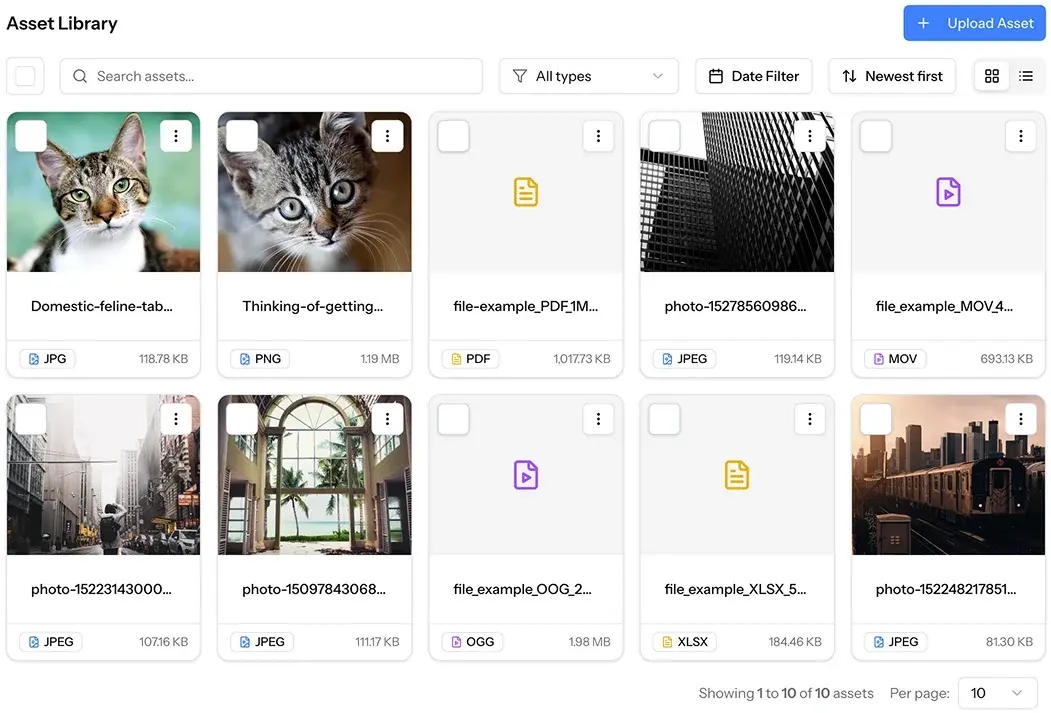

What the asset library does
Core media features for teams that ship websites and apps with structured content.
Project asset library
Upload, preview, search, and manage images, video, audio, and documents in one place per project.
WebP for new images
New image uploads store an optimized WebP file. The original stays available when Elmapi keeps it.
Direct S3 upload
Optional presigned and multipart upload to S3 or Spaces. Large files skip PHP upload limits.
Crop, resize, and rotate
Edit images in the CMS. See where each asset is used across content entries before you change it.
Grid and list views
Switch layout. Sort by name, size, date, or type. Filter by file type and date range.
Metadata you can search
Set alt text, title, caption, and related fields. Find files faster when the library grows.
From upload to delivery in four steps
Keep files in the library. Reuse them in Media fields. Serve stable URLs to your frontend.
Upload
Drag and drop or browse. Classic upload for local disks. Direct upload for S3.
Organize
Search, filter, sort, and open details. Add alt text and title for reuse.
Edit
Resize, rotate, or crop images. Review usage before you replace a file.
Deliver
Reference assets in Media fields. Use url, thumbnail_url, and original_url in the API.
Optimize new images. Keep the original when you need it.
New image uploads store as WebP. Elmapi keeps the original when it is available. You can resize, rotate, and crop in the asset editor.
- - WebP delivery for new raster uploads
- - original_url and original_path when an original exists
- - Usage panel shows which entries reference the file
- - New SVG uploads are rejected. Existing SVG assets still work.
Primary delivery URL. New images use the WebP file.
Smaller preview for grids, pickers, and admin lists.
Full original when Elmapi kept it after WebP conversion.
Upload large files without PHP size limits
If the project disk is s3 and ASSET_DIRECT_UPLOAD is true, clients upload to the bucket with presigned URLs. Multipart covers bigger objects.
- - Project storage disk must be s3 or S3-compatible
- - Bucket CORS must allow your CMS origin and PUT
- - Run a queue worker so image finalize jobs complete
- - Classic POST upload stays the default for local disks
Choose local storage or S3-compatible cloud
Each project uses one storage disk. Start local. Move to object storage when the library and traffic need it.
- - Local disk for simple self-hosted setups
- - AWS S3, DigitalOcean Spaces, Wasabi, and other S3 APIs
- - Same library UI and API on every disk
Use local storage for simple installs and early projects.
Store production assets in standard object storage.
Use S3-compatible storage with a simple setup.
Point the project disk at any S3-compatible provider.
Match filename, original name, or MIME type. Filter by image, video, audio, or document.
Sort by newest, oldest, name, or size. Bulk select and delete unused files.
Preview media, copy URLs, edit metadata, and see entry references.
Find files fast. See where they are used.
The details modal shows preview, metadata, and URLs. The usage list shows which content entries reference the asset. That helps you clean the library with less risk.
- - Date filters for today, week, month, and quarter
- - Arrow navigation between assets in the details modal
- - Bulk delete after you review usage
List, upload, and update assets from code
Use the REST Content API or the JS SDK. Bulk upload and bulk metadata updates cover migration and cleanup jobs.
- - List, get, upload, delete, and bulk actions
- - Public delivery URLs do not need an API key to fetch
- - Direct upload endpoints for large S3 transfers
Manage assets from Cursor or Claude Code
The official MCP server exposes asset tools next to collections and entries. You can list, read, and upload media without leaving the editor.
- - Package: @elmapicms/mcp-server
- - Works with Cursor, Claude Code, and other MCP clients
- - Bulk upload and metadata tools for larger jobs
Ready to manage media in ElmapiCMS?
Use the asset library for uploads, WebP images, usage tracking, S3 storage, and API delivery. Open the demo or read the docs.